Get One Month of Starlink FreeSPECIAL OFFER: GET A FREE MONTH OF STARLINK >
12

Getting Started & Installation

Getting started with Starlink: practical walkthroughs for first-time setup, activation, dish placement and installation.

More from Getting Started & Installation

View playlist

Starlink Home Setup: Order, Connect & Configure

Starlink home setup walkthrough from Scott’s Garage, covering ordering, hardware connections, Wi-Fi security and alignment in the Starlink app. The creator demonstrates a US setup. Hardware, plans and offers may differ by address and country; check your own Starlink checkout before ordering. Related guides: Starlink Installation Guide — Starlink Installation Guide How To Mount Your Dish At Home Should You Buy Starlink in the USA? — Should You Buy Starlink Usa Get One Month of Starlink Free — Claim Your Free Month: Starlink Check the offer and eligibility at checkout. Starlink Tips may receive a referral reward.

Starlink Home Setup: Order, Connect & Configure

Starlink home setup walkthrough from Scott’s Garage, covering ordering, hardware connections, Wi-Fi security and alignment in the Starlink app. The creator demonstrates a US setup. Hardware, plans and offers may differ by address and country; check your own Starlink checkout before ordering. Related guides: Starlink Installation Guide — Starlink Installation Guide How To Mount Your Dish At Home Should You Buy Starlink in the USA? — Should You Buy Starlink Usa Get One Month of Starlink Free — Claim Your Free Month: Starlink Check the offer and eligibility at checkout. Starlink Tips may receive a referral reward.

Questions & answers

Questions about this video

Straight answers to the questions readers ask most often.

How can I find a suitable Starlink position around trees and buildings?

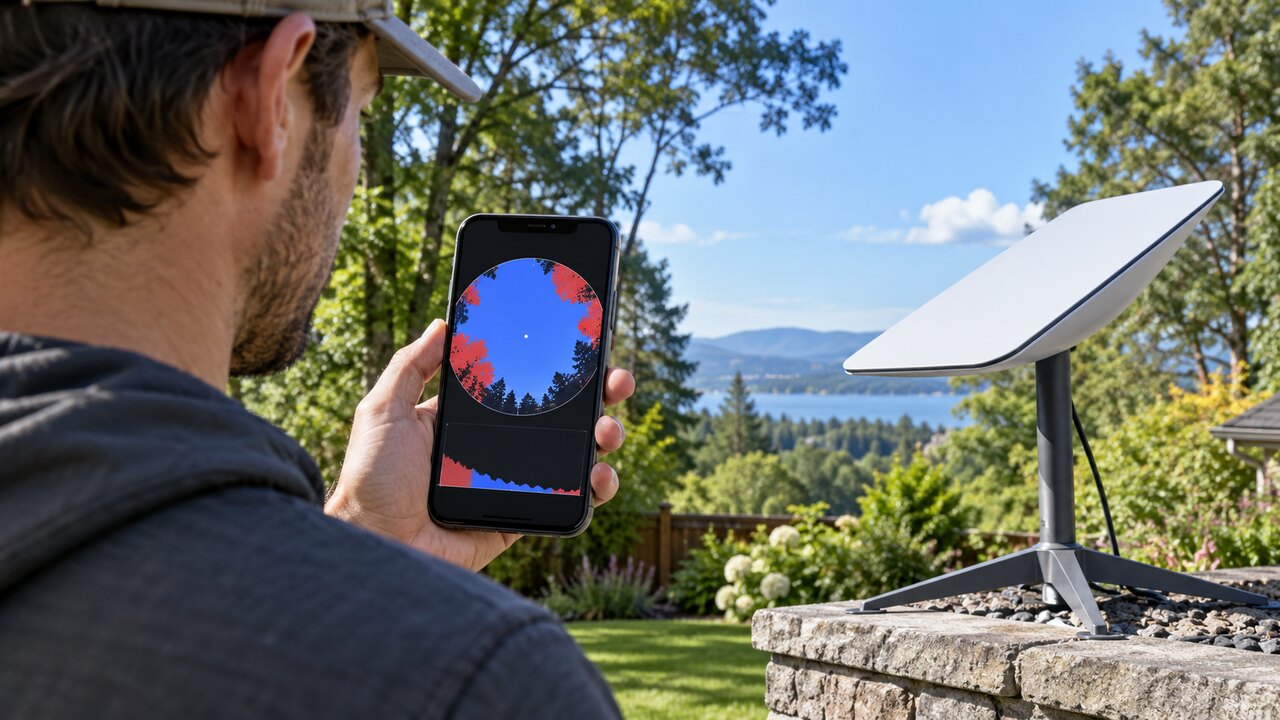
Trees and buildings can interrupt Starlink when they block the path between the dish and a satellite. An installation can connect successfully and still suffer interruptions, so an occasional good speed test is not proof that the location is suitable.

Use the Starlink app's obstruction tool to assess the proposed position before committing to a mount. Our practical checklist is:

  1. Compare several safely accessible positions around the property.
  2. Assess the intended dish position and height as closely as safe access allows. A check from the middle of the garden does not establish that a position beside the house will work.
  3. Consider how the view may change: leaves, growing branches, parked vehicles and future building work.
  4. Plan the cable route and maintenance access alongside the sky view.
  5. After installation, compare any interruption times with the app's obstruction information and your actual calls or other live applications.

A stronger indoor router or mesh system addresses local Wi-Fi coverage; it cannot remove a physical obstacle in the dish's view. If a clearer location requires work at height, ask a suitable installer to assess it.

Read our ground-mount location guide. For a related demonstration, see the video in our library: Why Starlink Fails: Rain, Obstructions & Solar Storms. A creator's demonstration is not a guarantee of results at your property.

Technical reference: Starlink Standard installation guide.

Reviewed: 23 September 2026.

Get One Month of Starlink Free

Claim Your Free Month

Order through my referral link and activate your service. Your second month of Starlink service will be free.
Open and share this answer
How can I check Starlink availability at my address?

Use Starlink's current order process for the exact place where the dish will be used. A neighbour's connection or a national coverage announcement is useful background, but it does not establish which offer your address can order.

Our buying checklist is:

  1. Enter the full service address and check its map position where shown.
  2. Read the plan and hardware options offered for that location.
  3. Review the initial payment, recurring price and any commitment or promotion.
  4. Separately assess whether the property has a practical dish location and cable route.
  5. Save the order details before paying.

If your address is not recognised, correct the details or seek official support rather than selecting an unrelated nearby property. Availability and a good installation are different questions: an accepted order does not prove that trees will not obstruct the dish.

Repeat the check if you delay ordering or move house. Do not cancel existing broadband solely because a map shows broad coverage.

Read our related guide: Starlink Availability Updates: How to Check Your Address Properly.

Related official guidance: Starlink service-plan descriptions.

Reviewed: 23 September 2026. Plan and hardware details should be checked for your country and equipment.

Get One Month of Starlink Free

Claim Your Free Month

Order through my referral link and activate your service. Your second month of Starlink service will be free.

Open and share this answer
How much should I budget for a complete Starlink setup?

Budget for the complete working installation, not just the advertised kit and monthly subscription. Which extras you need depends on your property and the equipment included in your order.

Make two lists:

  • One-off costs: delivery, a compatible permanent mount, an approved cable option, protected cable routing, professional installation and any necessary home-network equipment.
  • Ongoing costs: the selected service, electricity, any paid data options and subscriptions attached to optional networking products.

Ask an installer to explain what is included before comparing quotes. A cheaper quote that excludes access equipment or weatherproofing may not be the cheaper finished job.

For a useful comparison, calculate the first year's total and the following year's recurring cost separately. Treat promotional discounts and referral credits as specific benefits to verify, not permanent reductions in the normal price.

Start with the equipment you actually need. Test router coverage before buying several mesh nodes, and confirm your hardware has not already included an Ethernet connection before ordering an adapter.

Read our related guide: The Hidden Costs of Starlink: Mounts, Power, Cables and Wi-Fi.

Related official guidance: Standard hardware specifications.

Reviewed: 23 September 2026. Plan and hardware details should be checked for your country and equipment.

Get One Month of Starlink Free

Claim Your Free Month

Order through my referral link and activate your service. Your second month of Starlink service will be free.
Open and share this answer
Which Starlink kit suits me best: Mini or Standard?

Choose around your intended use, power supply and network layout. Mini integrates Wi-Fi into the portable terminal, while the Standard 4 X specification describes a separate Router 3. Both names refer to hardware; the service plan is a separate decision.

Before ordering, compare:

  • How often you will pack and move the equipment.
  • Where the dish will sit and where people need Wi-Fi.
  • Your available power and expected daily runtime.
  • The supported mounts, cables and Ethernet connections.
  • Which plans are offered for that kit in your country.

For a fixed property, think through the complete indoor network rather than assuming a portable terminal outside will cover every room. For travel, include the power supply, cables, mounting and protective storage in your packing comparison.

Our recommendation is to write down the one problem the new kit must solve, then compare current specifications against it. A smaller terminal is not automatically a better home installation, and newer hardware does not guarantee faster service at every location.

Read our related guide: Starlink Hardware Updates: Should Existing Customers Upgrade?.

Related official guidance: Mini hardware specifications.

Reviewed: 23 September 2026. Plan and hardware details should be checked for your country and equipment.

Get One Month of Starlink Free

Claim Your Free Month

Order through my referral link and activate your service. Your second month of Starlink service will be free.

Open and share this answer
How can I switch to Starlink without losing internet access?

It is usually more practical to test the new connection before ending the old one, if a short overlap is affordable. That gives you time to assess installation, household Wi-Fi and the applications that matter without leaving yourself dependent on an untested setup.

Before cancellation:

  • Check the old provider's notice period, remaining commitment and any linked services.
  • Test Starlink during normal busy periods, not just immediately after setup.
  • Confirm that work systems, cameras, printers and streaming devices behave as expected.
  • Decide whether you need a separate phone service or another replacement for bundled features.
  • Test your backup connection from the place you would actually use it.

Do not assume a good phone speed test proves everything in the home has migrated successfully. Make a short checklist and mark off each essential device.

If Starlink proves suitable, arrange cancellation using the old provider's official process and retain the confirmation. For a business or household where an outage has serious consequences, keeping a different access technology as backup may be worth the ongoing cost.

Read our related guide: How to Build a Backup Internet Plan for Starlink Outages.

Related official guidance: Starlink Help Center.

Reviewed: 23 September 2026. Plan and hardware details should be checked for your country and equipment.

Get One Month of Starlink Free

Claim Your Free Month

Order through my referral link and activate your service. Your second month of Starlink service will be free.
Open and share this answer
How can I order Starlink confidently and check genuine offers?

Verify an unexpected offer or support request independently before supplying information or paying. A familiar logo, sender name or copied invoice is not enough to establish authenticity.

Our practical checks are:

  1. Open the Starlink app or type the official website address yourself.
  2. Look for the corresponding order, bill or support conversation in your account.
  3. Compare the amount, service line and dates with your own records.
  4. Treat requests for passwords, one-time codes, remote computer access or payment to an unrelated account as a reason to stop and verify.
  5. Use the official support route if the message and account disagree.

Do not paste full account screenshots or payment details into public forums when asking for help. Describe the issue and remove private information.

For a referral offer, follow the referral link into Starlink's own order process and read the displayed eligibility. An independent referral website can explain an offer, but it cannot issue Starlink account credits itself or guarantee that an ineligible order will qualify.

Read our related guide: Starlink News: How to Tell Official Updates From Rumours.

Related official guidance: Starlink referral guidance.

Reviewed: 23 September 2026. Plan and hardware details should be checked for your country and equipment.

Get One Month of Starlink Free

Claim Your Free Month

Order through my referral link and activate your service. Your second month of Starlink service will be free.
Open and share this answer
Should I order Starlink directly or buy from a retailer?

Both buying routes can get you started with Starlink. The best choice is the one that offers the right kit, clear purchase terms and service availability at your address. Compare the complete cost and any eligible offers before deciding.

With a retail kit, buying the hardware and activating a Starlink subscription are separate steps. Starlink directs retail purchasers to its activation process, where the kit identifier, service location and available plan are checked.

What to check before ordering

Before purchase, confirm that the retailer is authorised, identify the exact hardware and check which service is available at your intended address. A sealed box on a shop shelf does not reserve Residential capacity. Compare accessories, delivery, returns handling and the full activated price.

Do not assume a direct-order promotion or referral offer also applies to a retail transaction. Check the terms of the specific offer before deciding where to order.

Keep the receipt and packaging while you complete activation and test the kit. If activation fails, record the exact error and contact the retailer or Starlink through their official support channels as appropriate.

Next useful answers

Related guides

Related video

How to Set Up Starlink Satellite Internet: Step-by-Step Installation Guide

This related demonstration may show older hardware or plan details; use the official guidance below for current requirements.

See the setup process

Starlink Home Setup: Order, Connect & Configure provides a practical walkthrough. Follow the current instructions for the exact kit you buy.

Sources

Reviewed: 26 September 2026. Practical checklists are our editorial recommendations; plan availability and hardware requirements vary by country and model.

Get One Month of Starlink Free

Claim Your Free Month

Eligible orders through my referral link can receive a service credit for the second month after activation. Check the offer and eligibility shown by Starlink before ordering.

Starlink Tips is independent and may receive a referral reward. See the offer shown by Starlink when ordering.

Open and share this answer
Can Starlink provide internet without a phone line or mobile signal?

Yes. Starlink can provide internet without a landline or local mobile coverage because its dish connects to satellites. That makes it worth considering for a home or remote location where conventional connections are limited. It still needs power, a suitable sky view and an active service.

What to check before ordering

Your phone normally joins the Starlink Wi-Fi network to use that connection. Losing mobile coverage does not itself mean the dish will stop working. However, account sign-in, app downloads and verification can be awkward if you arrive with nothing prepared.

Before going somewhere remote, download the official app and the guide for your model, check access to your email and account, and complete activation where practical. Retail activation arrangements can differ from an already active kit, so check the relevant instructions before departure. Keep essential instructions available offline. A working satellite link also does not automatically enable your mobile provider's Wi-Fi Calling service.

Next useful answers

Related guides

Related video

How to Set Up Starlink Satellite Internet: Step-by-Step Installation Guide

This related demonstration may show older hardware or plan details; use the official guidance below for current requirements.

Plan your first connection

Watch Starlink Home Setup: Order, Connect & Configure alongside the official setup guide for your kit.

Sources

Reviewed: 26 September 2026. Practical checklists are our editorial recommendations; plan availability and hardware requirements vary by country and model.

Get One Month of Starlink Free

Claim Your Free Month

Eligible orders through my referral link can receive a service credit for the second month after activation. Check the offer and eligibility shown by Starlink before ordering.

Starlink Tips is independent and may receive a referral reward. See the offer shown by Starlink when ordering.

Open and share this answer
Browse all questions