Get One Month of Starlink FreeSPECIAL OFFER: GET A FREE MONTH OF STARLINK >
9

Troubleshooting & Fixes

Useful fixes for Starlink dropouts, obstructions, slow speeds, Wi-Fi faults and hardware problems.

More from Troubleshooting & Fixes

View playlist

Starlink Mini Connection Problems - Obstructions #starlinkmini

Video by Digital Nomad Lifestyle on “Starlink Mini Connection Problems - Obstructions #starlinkmini”. Starlink Tips viewing notes: Compare safe dish positions using the obstruction tool, then inspect live connection behaviour after setup. A stronger indoor Wi-Fi router cannot remove a tree or building from the dish's sky view. Related answer: Will Starlink work if trees or buildings block the sky? — Will Starlink Work Trees Buildings Obstructions Related guide: Starlink Obstructions: How to Find a Clear Dish Location — Understanding Starlink Obstructions How To Find The Perfect Spot For Your Dish Get One Month of Starlink Free — Claim Your Free Month: Starlink Order through my referral link and activate your service. Your second month of Starlink service will be free. Starlink Tips may receive a referral reward. Check the offer shown by Starlink for your order.

Digital Nomad Lifestyle
Visit Digital Nomad Lifestyle →

Starlink Mini Connection Problems - Obstructions #starlinkmini

Video by Digital Nomad Lifestyle on “Starlink Mini Connection Problems - Obstructions #starlinkmini”. Starlink Tips viewing notes: Compare safe dish positions using the obstruction tool, then inspect live connection behaviour after setup. A stronger indoor Wi-Fi router cannot remove a tree or building from the dish's sky view. Related answer: Will Starlink work if trees or buildings block the sky? — Will Starlink Work Trees Buildings Obstructions Related guide: Starlink Obstructions: How to Find a Clear Dish Location — Understanding Starlink Obstructions How To Find The Perfect Spot For Your Dish Get One Month of Starlink Free — Claim Your Free Month: Starlink Order through my referral link and activate your service. Your second month of Starlink service will be free. Starlink Tips may receive a referral reward. Check the offer shown by Starlink for your order.

Digital Nomad Lifestyle
Visit Digital Nomad Lifestyle →

Questions & answers

Questions about this video

Straight answers to the questions readers ask most often.

How can I find a suitable Starlink position around trees and buildings?

Trees and buildings can interrupt Starlink when they block the path between the dish and a satellite. An installation can connect successfully and still suffer interruptions, so an occasional good speed test is not proof that the location is suitable.

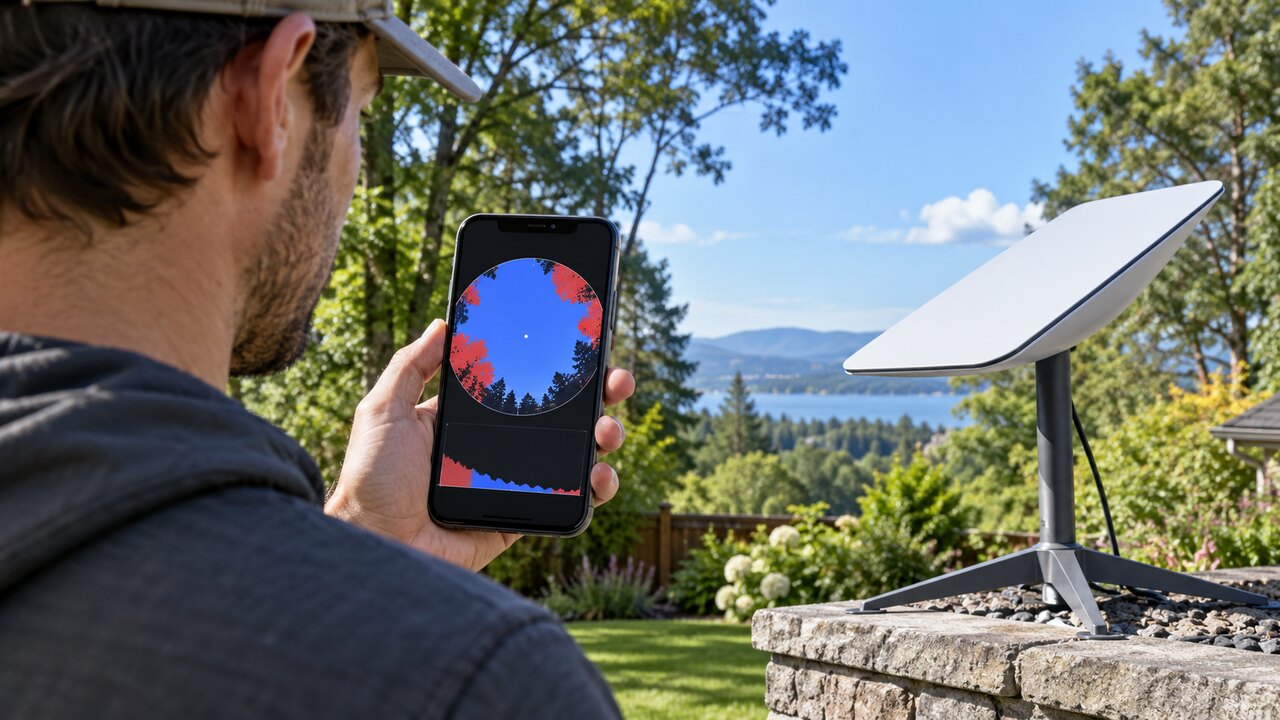
Use the Starlink app's obstruction tool to assess the proposed position before committing to a mount. Our practical checklist is:

  1. Compare several safely accessible positions around the property.
  2. Assess the intended dish position and height as closely as safe access allows. A check from the middle of the garden does not establish that a position beside the house will work.
  3. Consider how the view may change: leaves, growing branches, parked vehicles and future building work.
  4. Plan the cable route and maintenance access alongside the sky view.
  5. After installation, compare any interruption times with the app's obstruction information and your actual calls or other live applications.

A stronger indoor router or mesh system addresses local Wi-Fi coverage; it cannot remove a physical obstacle in the dish's view. If a clearer location requires work at height, ask a suitable installer to assess it.

Read our ground-mount location guide. For a related demonstration, see the video in our library: Why Starlink Fails: Rain, Obstructions & Solar Storms. A creator's demonstration is not a guarantee of results at your property.

Technical reference: Starlink Standard installation guide.

Reviewed: 23 September 2026.

Get One Month of Starlink Free

Claim Your Free Month

Order through my referral link and activate your service. Your second month of Starlink service will be free.
Open and share this answer
Browse all questions